
2026/02 - Late February Release
New Features
Preview: Shares - Download Screenshots to disk
This update introduces a new Option in the Share creation screen to allow recipients to download and save watermarked screenshots to disk.
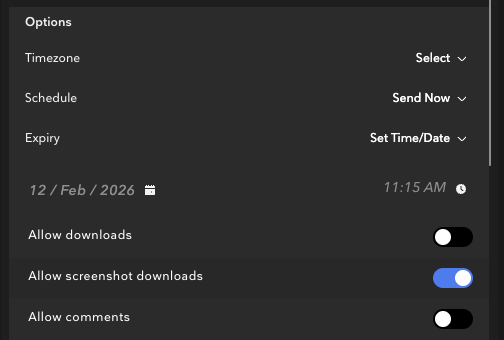
Enabling this function on a Share means that
- Recipients have access to the in-app Screenshot button when viewing the Share.
- Screenshots taken with this button by recipients will download a frame-specific Screenshot with the appropriate Share watermark applied as burn-in before download.
- These screenshots will then be able to be handled like any other image on a user's device.
- This function is available specifically to users with Downloader+Share (or greater) permission.
- This ensures that the person authorizing this Share for screenshot downloads already has the personal permission to Download and Share assets before passing on that permission to other users via the Share.
⠀
Shares - Download Screenshots to Photos (iOS)
When given the appropriate "Allow Screenshot Downloads" permission (preview) users are now also able to download screenshots locally to the Photos app on iOS and iPadOS.
Adding to the Photos app on iOS/iPadOS requires permission to access Photos, if you decline the prompt and need to grant access again at any stage this can be done by going to Settings>Privacy & Security > Photos and applying the appropriate permission.
This feature is currently in Preview and available on an opt-in basis - for more information on enabling this functionality have your Administrator contact Flow Capture Support.
Playlists and Shares - Go to Playlist
In this update we have introduced new functionality to the Information pane when previewing a Share that allows you to “Go to Playlist” and jump to the source playlist of the Share (provided you have required access/visibility).
This allows you to quickly jump in and make adjustments to a Share’s content from the Inbox without needing to manually locate the source!
Rooms - Lobby Improvements
For users who are the life of the party with access to large numbers of Rooms we have improved performance of the pre-Room lobby, allowing for enhanced loading and browsing of your Rooms.
Quick Rooms
Following our Preview period Quick Rooms are now available to all users, allowing you to quickly create and setup a Room directly from the Playlist screen.
Bug Fixes
Android - Player controls not disappearing
We have isolated and resolved an issue which could cause the player controls to not disappear as intended during playback.
Android - System pillarboxing and UI visible during playback
We have isolated and resolved an issue which could cause system UI elements (menu bar, pillarboxing) to not disappear as intended during playback.
CSV Import - Welcome Emails sending before import is confirmed
We have isolated and resolved an issue which could cause welcome emails to send to users before the CSV import was confirmed.
CSV - Failed Imports
We have isolated and resolved an issue which could cause import failures when importing a combination of SSO and non-SSO users at the same time.
Email - Fixes to body text and spacing
We have adjusted our email body templating to ensure that body text and paragraphing is enforced, improving how our emails preview on a number of devices.
Home - Projects disappearing when changing sorting
We have identified and resolved an issue which could cause projects to not display correctly (or at all) when adjucting the sorting options in Home.
iOS - Playlist Creation (redirect to Playlist on Creation)
We have identified and resolved an issue which could cause the app to not redirect to the newly created Playlist after creating in-app.
tvOS - Live Streaming not starting
We have identified and resolved an issue which could cause the tvOS app to not play back an active Live Streams.
Tags - Keep Tags on copy
We have identified and resolved an issue which could cause an assets Tags to not maintain when copying an asset.